Phishing
Recognise and prevent phishing attacks
Phishing is any form of cybercrime where criminals impersonate trusted sources to steal sensitive data. In 2021 alone, phishing and related attacks caused €62.5 million in fraud damages in the Netherlands — and the threat continues to grow worldwide.
88%
of cyber attacks start with phishing — making it by far the most common attack vector worldwide.
€62.5M
in payment fraud damages in 2021 in the Netherlands alone — phishing is the leading cause of financial cyber damage.
51%
of organisations end up on a fake login page — more than half of all businesses fall victim.
Types of phishing attacks
Phishing has evolved far beyond poorly written emails. Attackers now use increasingly sophisticated techniques across multiple channels to deceive their victims.
Email phishing
Messages that increasingly resemble genuine communications from your bank or suppliers. Criminals copy logos, writing styles and even email addresses to trick you into clicking a link or entering your credentials.
Vishing (Voice phishing)
Scammers call posing as bank employees or helpdesk staff. This method accounts for 76% of the €65.2 million in damages — making it the most lucrative form of phishing.
Smishing (SMS phishing)
Text messages or WhatsApp messages from someone pretending to be your child who needs money, or a delivery service with a link to a fake website. Increasingly difficult to distinguish from real messages.
Social media phishing
Fake login pages for platforms like Instagram or LinkedIn to take over accounts. Compromised accounts are then used to target contacts with even more convincing phishing attempts.
How to recognise phishing
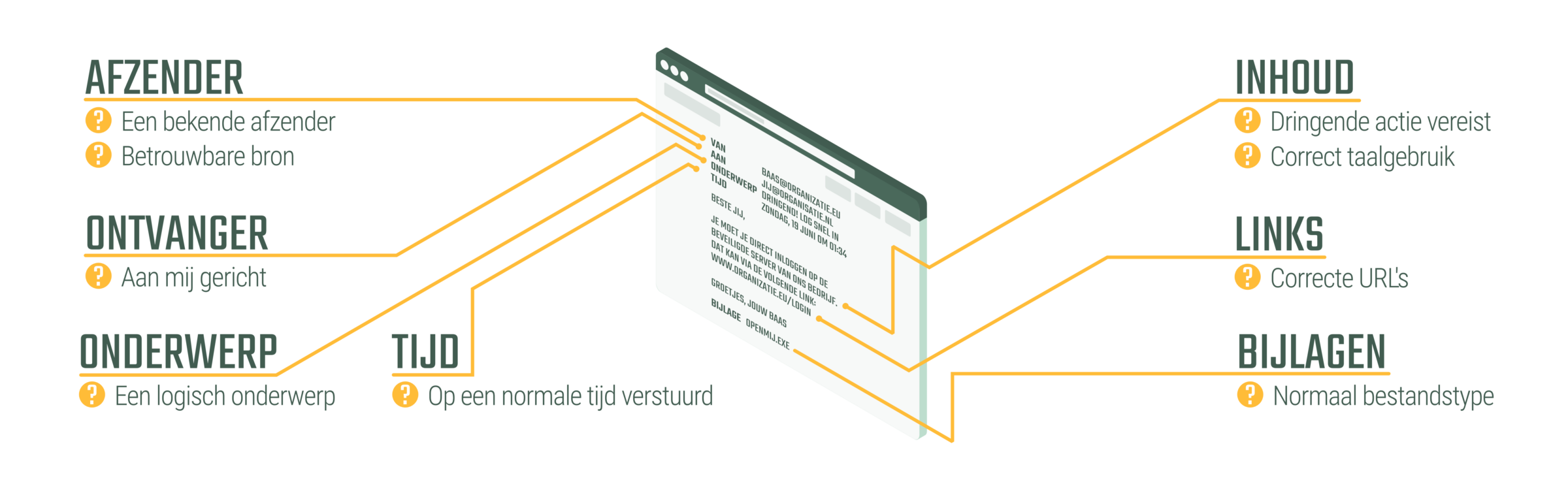
Develop a healthy sense of suspicion. Before clicking any link or entering your details, check these key indicators for every message you receive.
- Sender — Is this someone you normally communicate with? Does the domain look correct?
- Recipient — Are you the only recipient, or was it sent to an unusual distribution list?
- Links — Hover over links to check the actual URL before clicking.
- Content — Is there artificial urgency pushing you to act immediately?
- Attachments — Does the attachment make sense, and is it a normal file type?
- Subject & Timing — Does the subject match the sender? Was it sent at a reasonable time?
The latest threat: AiTM phishing
Modern phishing goes beyond email. In Adversary-in-the-Middle (AiTM) attacks, criminals place a proxy server between you and the real login page. This allows them to intercept not just your password, but also your MFA token — effectively bypassing multi-factor authentication entirely.
Attic FREE detects AiTM attacks in real-time. Your employees are warned before they enter their credentials on a fake login page.
Learn more about AiTMHow Attic protects you
Attic provides multiple layers of protection against phishing — from real-time warnings to administrator notifications.
Red warning screen on fake login pages
When an employee lands on a phishing site impersonating Microsoft 365, a prominent red warning screen appears, preventing them from entering their credentials.
Authenticity seal on real Microsoft 365 pages
On the official Microsoft login page, Attic displays a recognisable green seal, so employees always know they are on the genuine page.
Admin notifications on fake page visits
IT administrators receive an immediate notification when anyone in the organisation visits a phishing page, enabling swift incident response.
Stop phishing before it causes damage
Protect your employees and your organisation with Attic. Start free and activate advanced protection when you are ready.